👋 Welcome to netLex Lighthouse!
Lighthouse is our documentation portal, where we publish technical specifications about our integrations and APIs.
With Lighthouse, you will be able to:
- Use the technical specifications to explore and use our APIs;
Not familiar with netLex yet? Then take a look at our institutional website.
💡 Getting started
Our documentation is divided into authorization and HTTPS requests.
Authorization
Divided into:
- Bearer token: is used for authentication on the endpoints.
- Restricción por IP: access to the endpoints can optionally be restricted by IP.
HTTPS Request
Divided into:
- Endpoints
- Document: intended for handling the environment's documents.
- DocumentAttachmet: intended for handling document attachments.
- User: intended for handling users.
- Contact: intended for handling Contacts.
- Management: intended for handling document management.
❓ Need support?
If you need support, please contact us through our Help Center.
Connect is a REST API that enables the execution of scripts configured on the platform through a specific ID. The API receives input data (payload) and returns a response in JSON format. In each configured script, you can define how the methods of the platform's private APIs will be used, which are available through classes, using input as a parameter. The result or the information obtained is then returned in the output.
Authorization
Bearer Token
A Bearer Token is required to authenticate on netLex endpoints. The token has no expiration time. Each endpoint has its own Bearer Token.
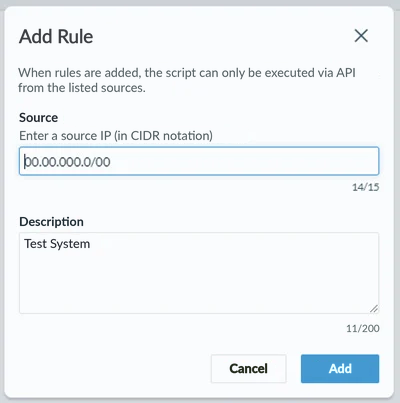
IP Restriction
Access to the endpoint can also be restricted by IP. Up to 100 origins can be registered. This restriction is optional.
HTTPS Requests
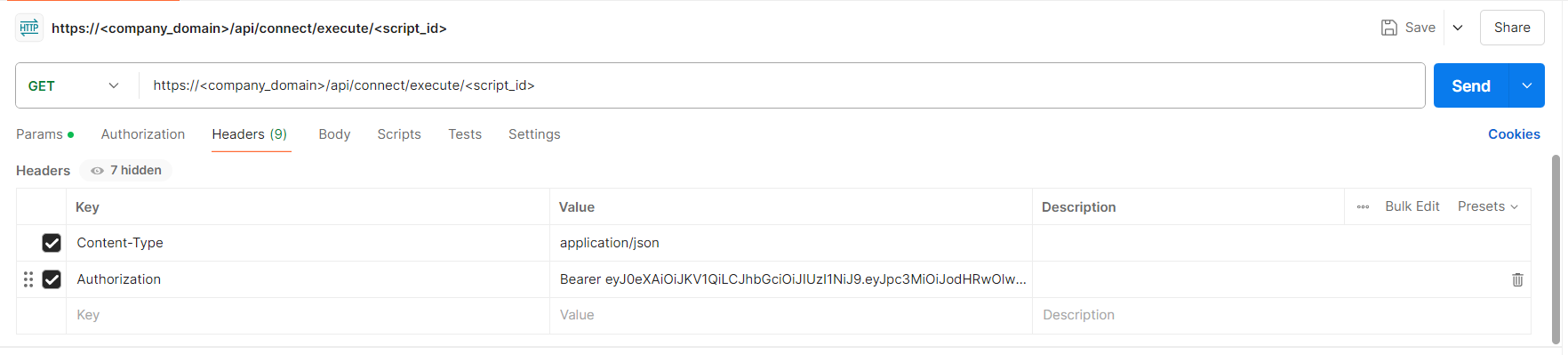
To make a request to any netLex endpoint, simply provide the URL composed of the domain and the endpoint ID, and provide the specific Bearer token in the Header. What will differ between calls is the REST Body of the request and the response, which is defined according to the use case developed for that endpoint.
Endpoints
netLex endpoints are created dynamically according to the needs of the use case. In them, it is possible to configure a script to perform actions with the various netLex features, such as creating a document, updating a contact or returning workflow information, using the features available in the Connect Classes.
Connect Classes
The classes that can be handled within the endpoint scripts are specified below, considering their accessible methods and attributes.
-
Document
Intended for handling the environment's documents.
Available methods:find:Returns a document by ID.get:Returns an iterator with all or a set of the environment's documents according to the parameters provided. The search is paginated.upload_main_file:Uploads a PDF or Docx file as the main file of a document.save:Records the changes. Completes the creation.delete:Deletes the document.to_dict:Returns a dictionary with the Document's attributes.
Available attributes:
id:Document ID.name:Document name.template_id:ID of the template that originated this document.metadata:List of the document's metadata.folder_id:ID of the folder where the document is located.type_id:ID of the document type.subtype_id:ID of the document subtype.number:Document number.is_signed:Signed document.answers:Dictionary of the document's answers.workflow:Document workflow.author:Document author.created_at:Document creation date.updated_at:Date of the document's last update.document_file:Document file.document_file_pdf:Document file in PDF.attachments:List of the document's attachments.
Application example:
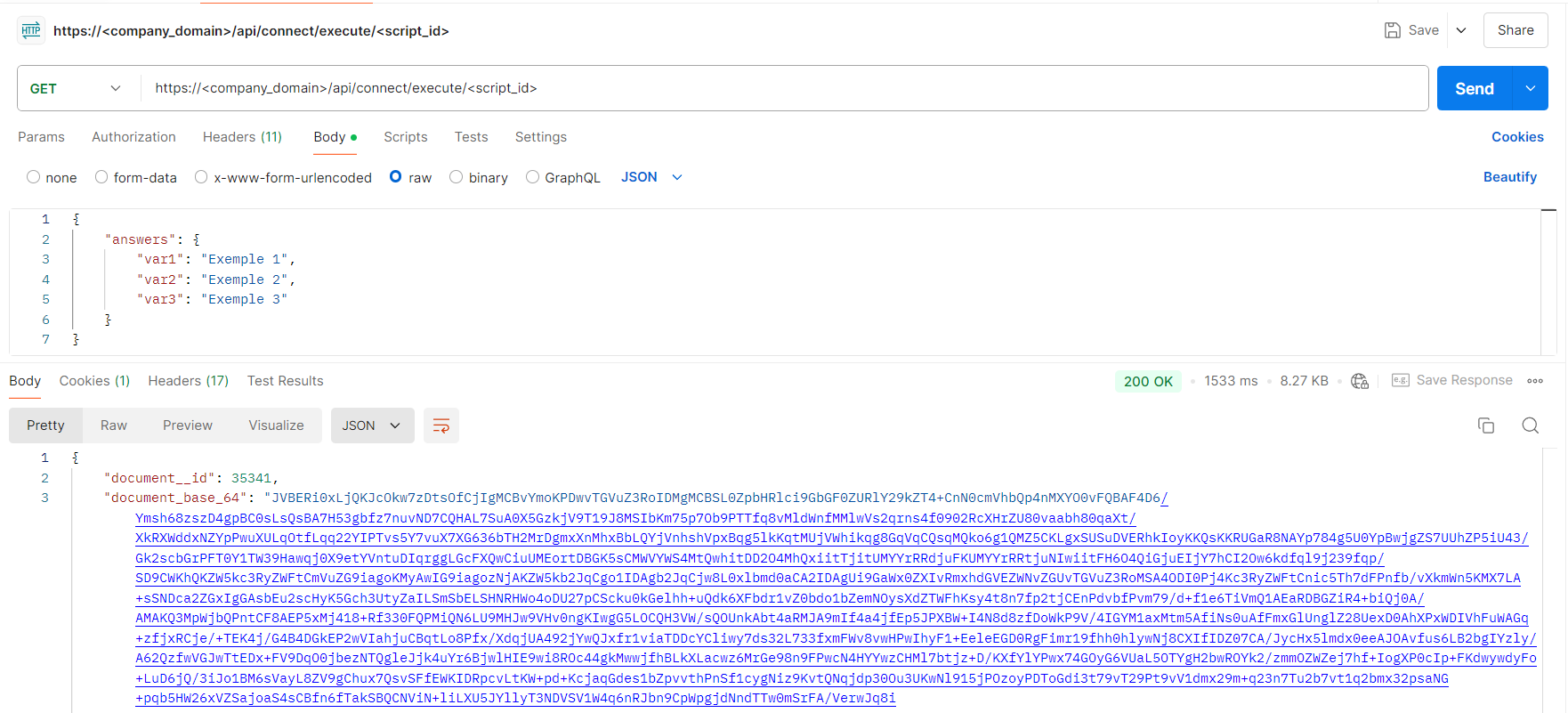
It is possible to develop an endpoint whose purpose is to create a document, where the values of the variables that make up the document are provided in the request body, and the response body returns the document's ID within netLex and its base64.
-
DocumentAttachment
Intended for handling document attachments.
Available methods:save:Records the changes. Completes the creation.to_dict:Returns a dictionary with the Attachment's attributes.
Available attributes:
created_at:Attachment creation date.description:Attachment description.document_id:ID of the document linked to the attachment, used only for creation.extension:Attachment file extension.file:Attachment file.file_name:Attachment file name.id:Attachment ID.updated_at:Attachment update date.
Application example:
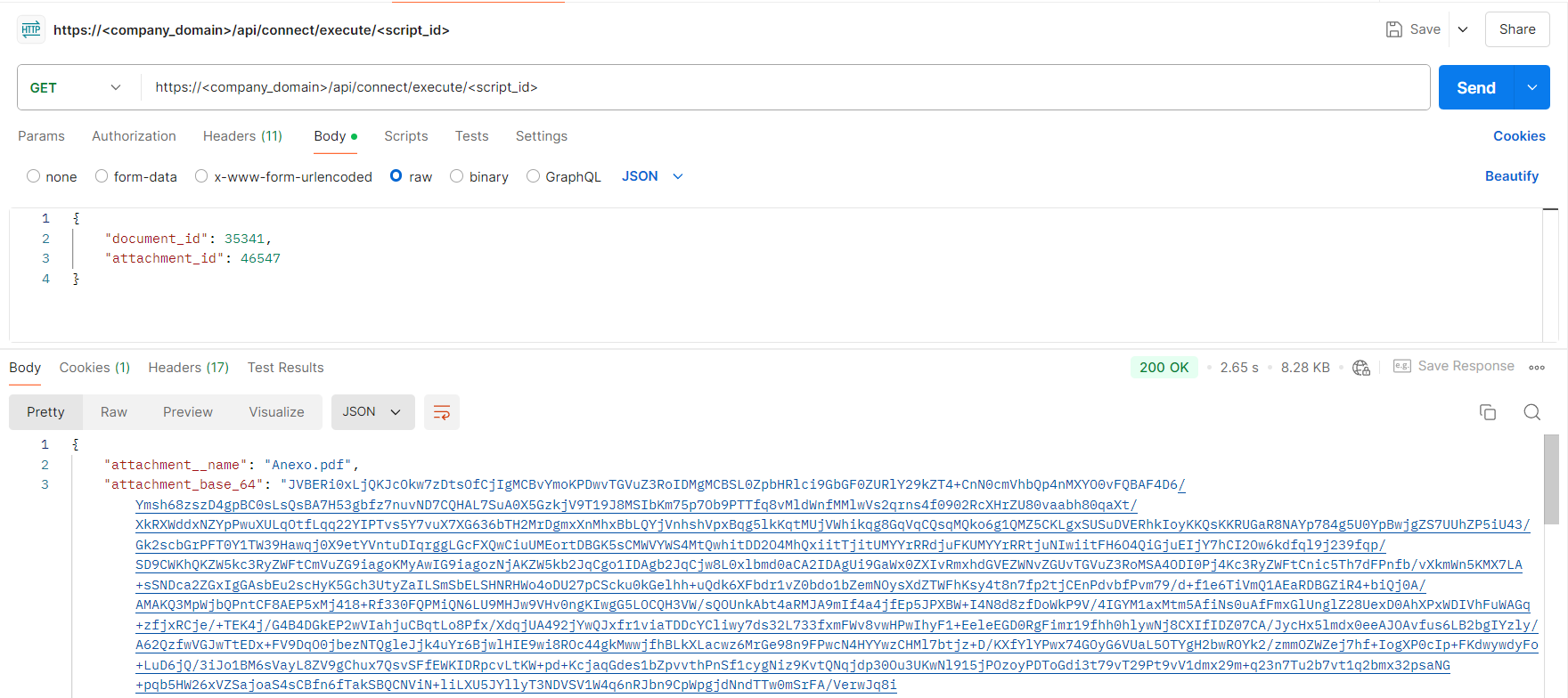
It is possible to develop an endpoint whose purpose is to retrieve the base64 of an attachment of a given document, where the attachment ID and the document ID are provided in the request body, and the response body returns the attachment's name and its base64.
-
User
Intended for handling users.
Available methods:find:Returns a user by ID.find_by_email:Searches for the user by e-mail.get:Returns an iterator of the users of an environment.save:Records the changes. Completes the creation.to_dict:Returns a dictionary with the user's attributes.
Available attributes:
id:User ID. Typo: int.name:User name. Type: str.email:User e-mail. Type: str.initials:User initials. Typo: str.sso:Whether the user logs in via SSO. Type: bool.roles:List of access profiles. Type: list.
Application example:
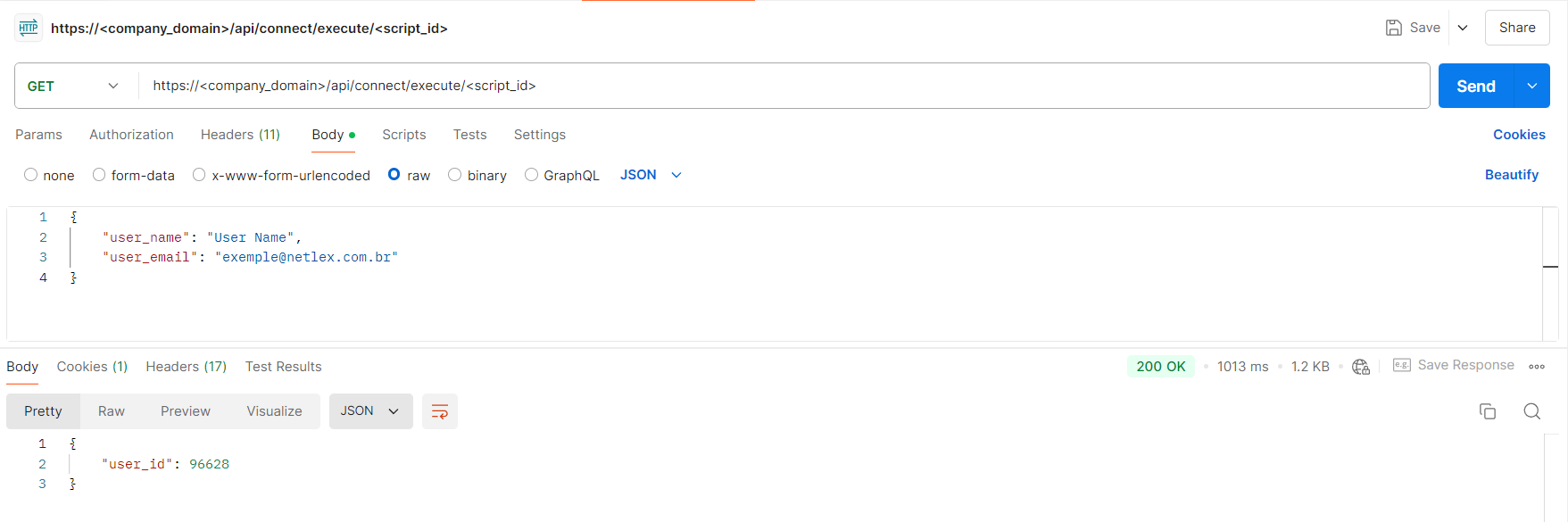
It is possible to develop an endpoint whose purpose is to create a user, where the name and e-mail are provided in the request body, and the response body returns the user's ID if created, or a message stating that a user already exists for that e-mail.
-
Contact
Intended for handling Contacts.
Available methods:find:Returns a contact by ID.find_by_document_number:Returns a contact by the document number (CPF or CNPJ).find_by_email:Returns a contact by e-mail.get:Returns an iterator of the contacts.save:Records the changes. Completes the creation.to_dict:Returns a dictionary with the Contact's attributes.
Available attributes:
birthdate:Contact's date of birth. Type: datetime.cellphone:Contact's mobile phone number. When creating a contact with this information, a mask will be required: "(XX) XXXX-XXXX" or "(XX) XXXXX-XXXX". Type: str.city:Contact's city. Type: str.contact_type:Contact type. Value 1 indicates Legal Entity (Pessoa Jurídica) and value 0 indicates Individual (Pessoa Física). Type: int.country:Contact's country. Type: str.district:Neighborhood of the contact's address. Type: str.document_number:Contact's CPF or CNPJ. When creating a contact with this information, a mask is required: for CPF "XXX.XXX.XXX-XX" and for CNPJ "XX.XXX.XXX/XXXX-XX". Type: str.email:Contact's e-mail. When creating a contact with this information, a valid e-mail format must be provided. Type: str.father_name:Name of the contact's father. Type: str.genre:Contact's gender. Predefined values: "masculino", "feminino". Type: str.head_office:Headquarters or Branch. Value True indicates Headquarters and value False indicates Branch. Type: bool.id:Contact ID. Type: int.identity_document:Type of the contact's identification document. Predefined values: "carteira de identidade", "carteira de identificação funcional", "carteira de trabalho", "carteira nacional de habilitação", "carteira profissional", "cédula de identidade militar", "identidade de estrangeiro (RNE)", "passaporte". Type: str.identity_issuer:Issuing authority of the contact's identification document. Type: str.identity_number:Number of the contact's identification document. Type: str.job_title:Contact's profession. Type: str.marital_status:Contact's marital status. Predefined values: "casado", "divorciado", "separado", "solteiro", "viúvo", "casada", "divorciada", "separada", "solteira", "viúva", "união estável". Type: str.mother_name:Name of the contact's mother. Type: str.municipal_registration:Contact's Municipal Registration. Type: str.name:Contact's name. Type: str.nationality:Contact's nationality. Predefined values: very extensive list; when necessary, please request it from netLex. Type: str.nickname:Contact's nickname or trade name. Type: str.nire:Contact's NIRE number. Type: str.phone:Contact's phone number. When creating a contact with this information, a mask is required: "(XX) XXXX-XXXX". Type: str.professional_identity:Contact's professional identification. Type: str.professional_identity_issuer:Issuing authority of the contact's professional identification. Type: str.state:Contact's state. When creating a contact with this information, the state abbreviation must be provided in uppercase. Type: str.state_registration:Contact's state registration. Type: str.street:Street of the contact's address. Type: str.street_complement:Complement of the contact's address. Type: str.street_number:Number of the contact's address. Type: str.type:Contact's corporate type. Predefined values: very extensive list; when necessary, please request it from netLex. Type: str.voter_document:Contact's voter registration card (título de eleitor). Type: str.website:Contact's website. Type: str.work_document:Contact's work card (carteira de trabalho) information. Type: str.zip_code:Contact's CEP (postal code). When creating a contact with this information, a mask is required: "XX.XXX-XX". Type: str.
Application example:
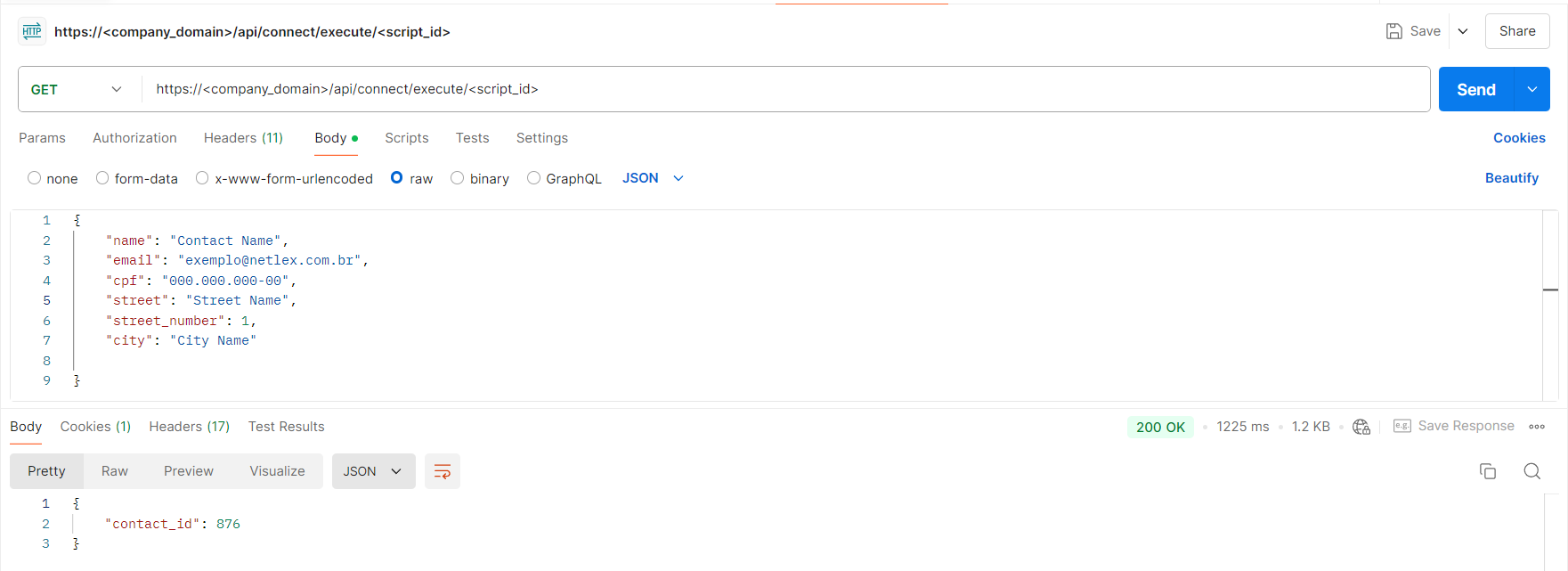
It is possible to develop an endpoint whose purpose is to create a contact, where several attributes are provided in the request body, and the response body returns the contact's ID if created, or a message stating that a contact with the same CPF/CNPJ or e-mail already exists.
-
Management
Set of classes that allow handling document management, making it possible to handle Tabs, Tables, Columns, Rows and Cells.
Application example:
It is possible to develop an endpoint whose purpose is to change values in a table inserted in the document management. Supposing that a document has a table that will contain the product records, as shown in the following image:

With this, it is possible to specify in the request which document, product and quantity the changes will be made to, as demonstrated below:
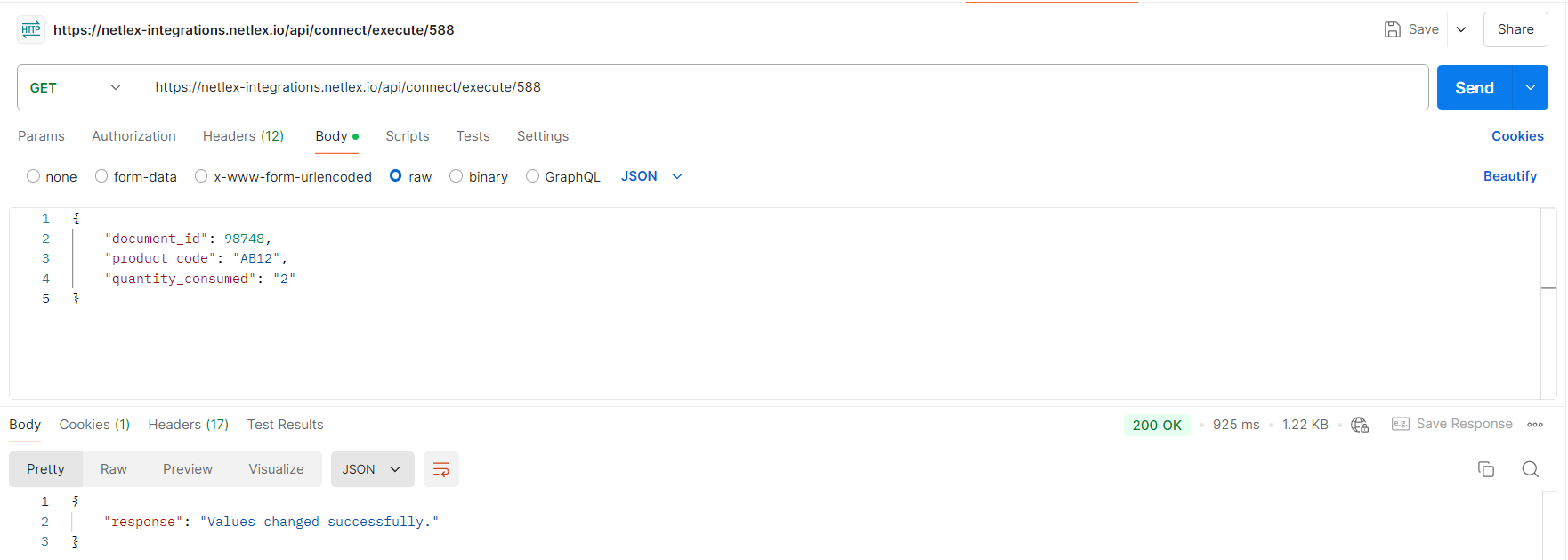
The endpoint will receive the values and make the change in the management following the use case guidelines, making it possible to keep the information up to date in accordance with other systems.
